UnSpoof.Me
3 Free Uses + Ad-Supported

Keep Your Phone in Your Actual City During GPS Attacks

🟢 Now Live on Google Play
🛡️ 100% Free Trial 🔒 On-Device Privacy ⚡ No Root Required 📱 Android 7.0–16+

Tired of waking up in Amman or Beirut? GPS spoofing is super annoying. It messes up your morning weather, changes your Google currency, throws off your dating apps, and worst of all—it can block your local Red Alert missile sirens! UnSpoof.Me acts as your digital anchor, ignores the fake satellites, and uses Android's native network positioning to put your phone right back home.

🚗 A Note on Driving & Navigation:

This app is designed to anchor your daily life, but it won't magically fix your navigation. Because network positioning isn't as precise as satellites, using UnSpoof.Me will not significantly improve your turn-by-turn navigation in Waze or Google Maps while the GPS is corrupted compared to just driving without the app. But for your weather, alarms, dating apps, and emergency alerts? You'll be right back home!
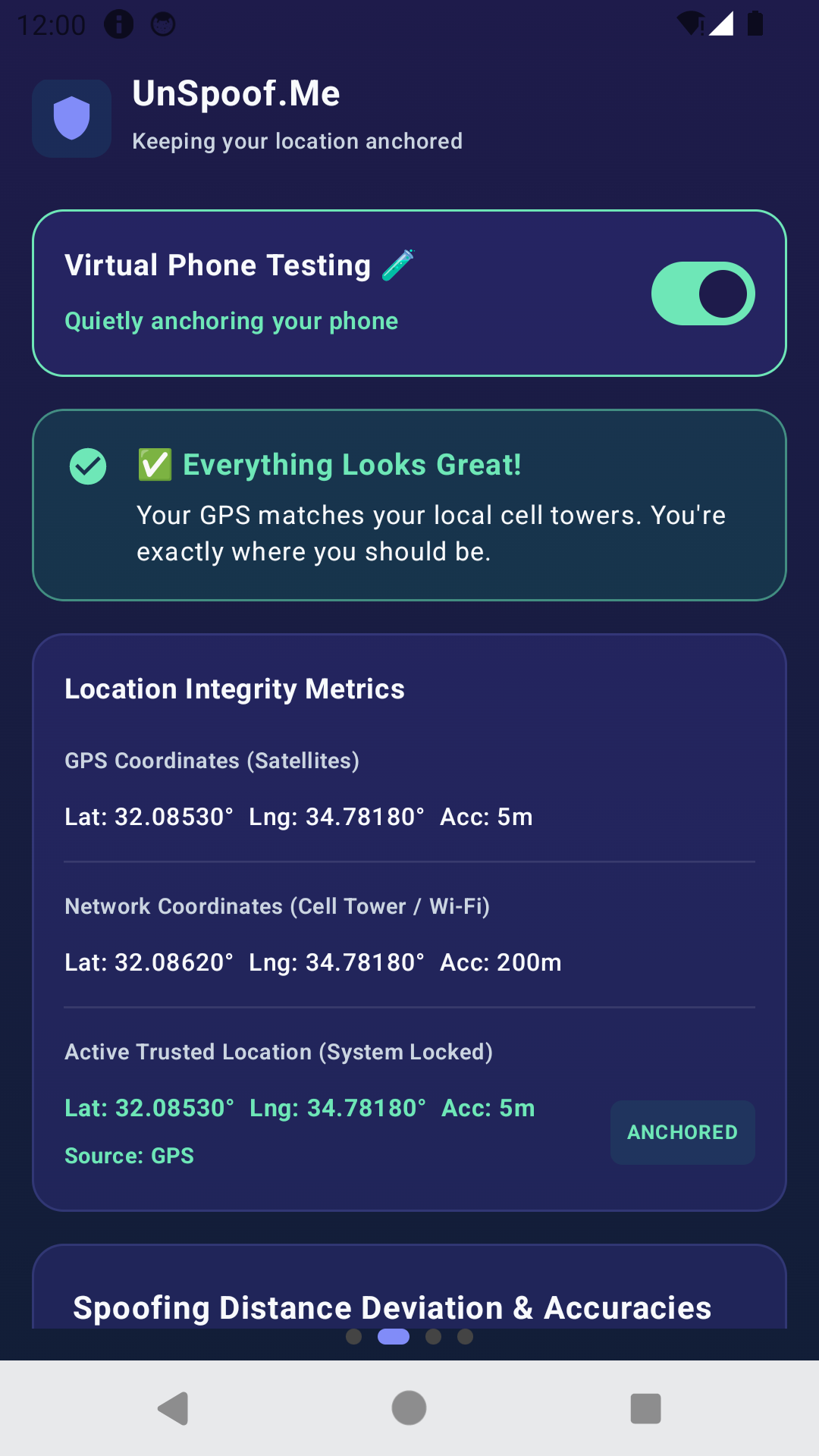
UnSpoof.Me App Dashboard Mockup showing active shield protection

Why GPS Satellites Lie

Global Positioning Systems are fragile. When spoofing transmitters override weak space signals, your phone blindly jumps to another country. UnSpoof.Me puts you back on the ground.

🛰️

How GPS Works

Your phone listens to satellites via trilateration. If a spoofer broadcasts fake satellite data, your phone accepts it as absolute truth and displays your location thousands of miles away.

⚡

What is Jamming?

A brute-force static attack. Jamming devices flood satellite frequencies with noise, leaving you location-blind and unable to lock coordinates in a "GPS-denied environment".

📍

What is Spoofing?

A deceptive hijacking threat. A fake transmitter sends coordinates convincing your phone it's elsewhere. For example, a phone in Haifa gets spoofed coordinates mapping to Beirut or Amman Airports.

Interactive Attack Simulator

See how UnSpoof.Me anchors your device back to Haifa in real-time

GPS Sat L1
Spoofer RX
GPS Sat L5
📶
CID: 4092 (Haifa)
📶
CID: 8712 (Haifa Sub)
📍 Haifa (True Pos)
⚠️ Beirut Airport (Spoofed!)
Live Status Feed SECURE

> GPS core initialised...

> Satellites connected: GNSS [G12, G18, G24]

> Current Position: Haifa (32.7940° N, 34.9896° E)

GPS System Nominal

The device is utilizing satellites from global networks. Triangulating positions normally. Active position locked to Haifa, Israel. Coordinates resolved accurately.

Simple Setup

How to Get Anchored

To ignore fake satellites, UnSpoof.Me uses Android's Mock Locations to tell your phone to trust clean location data. Follow these quick steps to get protected.

1

Enable Developer Options

Go to Settings > About Phone. Tap "Build Number" 7 times until developer options unlock.

2

Select UnSpoof.Me

Open Developer Options, locate "Select mock location app", and choose "UnSpoof.Me" from the list.

3

Grant Location Access

Open the app and accept location permissions. The app will immediately lock onto your true position.

✓

Alarms & Apps Fixed!

Return to your home city. Your morning weather, alarms, dating apps, and sirens are now fully protected from fake satellite signals.

Trust & Safety

Why We Need Permissions

No secrets here! We request these permissions solely to build your location anchor from native Android services.

Location Access

ACCESS_FINE_LOCATION

Why we need it: To access Android's native Network Provider so we know where you actually are.

Android requires this permission to let apps request precise location data.

Notification Access

POST_NOTIFICATIONS

Why we need it: To run a quiet status indicator in the background, and to send a silent system alert when your 24-hour protection session ends.

Android requires a persistent notification for background services to ensure transparency.

Internet & Network

INTERNET

Required for Operation: We require internet access for Android's native Location Services (Google Play Services) to securely resolve your real coordinates using Wi-Fi and cell networks.

Ad-Supported Model: Network access is also required to load Google AdMob advertisements if you choose to extend your protection beyond the free uses.

Foreground Service

FOREGROUND_SERVICE

Continuous Watchdog: To actively override spoofed coordinates, the app must run a continuous background watchdog service.

This ensures your phone stays anchored to your local city even when the app is closed.

💡 Direct Answers & Knowledge Base

Frequently Asked Questions

Clear explanations about GPS spoofing, regional disruptions, and how UnSpoof.Me protects your Android device.

🟢 Now Live on Google Play Store

Reclaim Your Real Location Today

Don't let GPS spoofing disrupt your alarms, sirens, and daily apps. Download UnSpoof.Me now from Google Play and stay anchored.

✓ 3 Free 24h Sessions Included ✓ 100% On-Device • Zero Data Sold ✓ Android 16 Ready
Privacy & Legal Compliance

Privacy Policy & EULA

Israeli Protection of Privacy Law (Amendment 13) Compliant Disclosure

Need Support?

Have any questions, issues, or friendly feedback? Reach out directly and we will get back to you shortly!

Now Available Google Play
Download Now